How to calibrate a Zebra printer
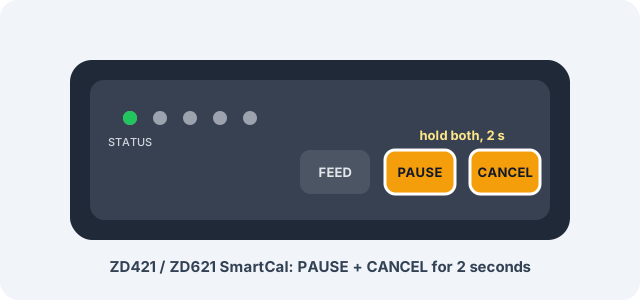
On most Zebra desktop printers you calibrate by loading the labels, closing the cover and holding PAUSE + CANCEL together for two seconds. On a ZD220 or ZD230, hold FEED until the light blinks twice. On a GK420d, hold FEED until the light flashes twice. The printer feeds a few labels, measures the gap, and stops at the top of the next one.
- You needThe printer, the roll you're about to print on, and its cover closed.
- Time it takesA few seconds and a few labels.
- What you getZebra printer calibration that finds the gap, so each label starts where it should.
Which buttons calibrate my Zebra printer?
It depends on the family. Find your model on the front of the printer, then use its row.
| Model | How to calibrate | What you'll see |
|---|---|---|
| ZD421, ZD621 | PAUSE + CANCEL, 2 seconds | Feeds a few labels, then STATUS is solid green |
| ZD410, ZD420, ZD620 | PAUSE + CANCEL, 2 seconds | Feeds and measures a few labels |
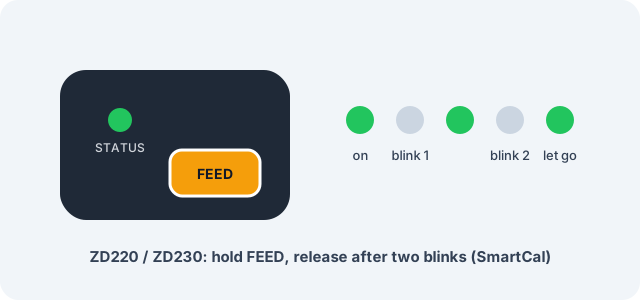
| ZD220, ZD230 | Hold FEED until STATUS blinks off and on twice | SmartCal |
| GK420d, GK420t, GX420d | Hold FEED until 2 flashes | Standard calibration, feeds 1 to 4 labels |
| ZT230 | PAUSE + CANCEL, 2 seconds, or the menu | Guided liner and label calibration |
| ZT411, ZT421 | The menu, or PAUSE + FEED + CANCEL for 2 seconds | Guided calibration |
| LP 2844, TLP 2844 | Power on while holding FEED | AutoSense, then a status printout |
When should you calibrate a Zebra printer?
Calibrate when you load a different label size or type. Gap labels, black mark labels and notched labels all read differently, and the printer has to learn which one it's holding.
Calibrate too when labels skip or come out blank, when the print lands across two labels, or when an error light comes on right after you load a roll.
You don't need a full calibration for every roll. Zebra's ZD421 and ZD621 guide says a new roll of the same media from the same batch only needs FEED pressed once or twice. That saves a few labels every time.
Calibration doesn't change the size of your design. The printer learns where each label starts. The size you print at is set in the label software, which is the last step on this page.
How do I calibrate a Zebra ZD421 or ZD621?
The ZD421 and ZD621 use SmartCal. It takes a few seconds.
- Load the labels, plus ribbon if you print thermal transfer. Close the cover.
- Wait until the STATUS light is solid green.
- Press and hold PAUSE and CANCEL together for 2 seconds, then let go.
- The printer feeds and measures a few labels. When STATUS is solid green again, it's done.
On a model with the colour touch display, there's also a manual calibration wizard under Print > Sensors > Manual Calibration.
If you change label sizes a lot, the Power Up Action and Head Close Action settings can both be set to CALIBRATE. Then the printer measures by itself each time you turn it on or close the head.
For ZD421 label size calibration, there's one more step after the printer: set the same size in the software. Then set the label size in the app, which is covered at the end of this page.
How do I calibrate a ZD410, ZD420 or ZD620?
SmartCal is the same as on the ZD421: hold PAUSE and CANCEL for 2 seconds.
If SmartCal doesn't recognise your media, Zebra has a manual calibration. Do it in this order:
- Hold PAUSE for 2 seconds to enter Advanced mode. All the lights flash yellow.
- Press PAUSE while STATUS is yellow.
- Check the media sensor position: centre for gap labels, on the mark for black mark or notched media.
- Peel 80 mm (3 in) of labels off the liner and lay the bare liner over the platen roller.
- Close the printer and press PAUSE once. It measures the liner.
- Open the printer, move a label over the sensor, close it and press PAUSE once.
- The printer feeds a few labels and goes back to Ready.
On the ZD620 with the LCD, go to HOME, TOOLS, MEDIA/RIBBON CAL, START. Then follow LOAD BACKING and RELOAD ALL CONTINUE, pressing PAUSE at each one.
How do I calibrate a Zebra ZD220 or ZD230?
With the STATUS light solid green, hold FEED until the light blinks off and on twice. Then let go. That runs SmartCal.
Count carefully. Let go after one blink and you get a configuration report instead. Three blinks resets the printer to factory defaults.
How do I calibrate a Zebra GK420d or GX420d?
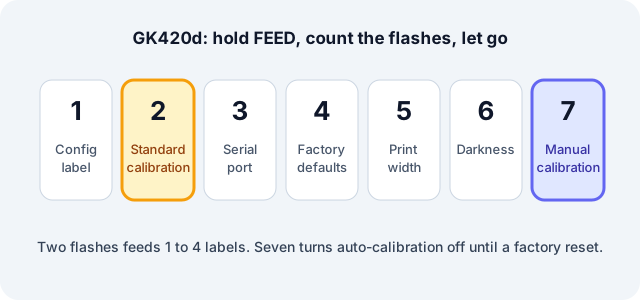
The GK420d, GK420t and GX420d do everything through the FEED button. With the power on and the cover closed, hold FEED and let go after the number of flashes you need.
| Flashes | What happens |
|---|---|
| 1 | Configuration label |
| 2 | Standard calibration (feeds 1 to 4 labels) |
| 3 | Serial port settings |
| 4 | Factory defaults |
| 5 | Print width |
| 6 | Darkness |
| 7 | Manual calibration (prints a sensor profile) |
Two flashes is the one you want most days.
Seven flashes runs manual calibration, and it turns auto-calibration off until the printer is reset to factory defaults. If you used it once and the printer stopped measuring new rolls by itself, that's why.
How do I calibrate a Zebra ZT230 or ZT411?
On a ZT230, hold PAUSE and CANCEL for 2 seconds, or start it from the TOOLS menu. Then the printer walks you through it:
- Open the printhead and pull out about 203 mm (8 in) of media.
- Peel the labels off that length so only liner is left, and pull the liner between the sensors.
- Take out the ribbon if you use one, close the printhead and press PAUSE.
- When the display shows RELOAD ALL / CONTINUE, put a label under the sensors, reload the ribbon, close the head and the door, and press PAUSE.
- Press FEED and check that one label comes out per press.
On a ZT411 or ZT421, go to Print > Sensors > Manual Calibration > Start Calibration, or hold PAUSE, FEED and CANCEL together for 2 seconds.
Follow every prompt, even if only one sensor needs adjusting. Holding CANCEL stops the calibration. Press PAUSE at the end to take the printer out of pause.
The tear-off position is a separate setting, under Print > Label Position.
How do I calibrate an LP 2844 or TLP 2844?
These older printers use AutoSense:
- With labels loaded, switch the printer off.
- Hold FEED and switch it on.
- Let go when the status light flashes.
- The printer measures the labels and prints a status dump.
- Tap FEED to leave dump mode. It prints "out of DUMP".
One honest note. The LP 2844 and TLP 2844 speak EPL. mylabelmaker sends ZPL, so a plain LP 2844 can't print from the app. The calibration works the same either way.
Calibrated and still skipping labels?
Check these three things, in this order.
- The sensor matches the roll. Gap labels need the gap sensor. A black mark roll needs the black mark setting.
- The label size in your software matches the roll. In mylabelmaker, open the template that matches it, for example the 4 x 6 shipping label or the 2 x 1 barcode. The app reads the dpi (203, 300 or 600) from the printer's configuration.
- Darkness and speed. Too dark or too fast can look like a feed problem.
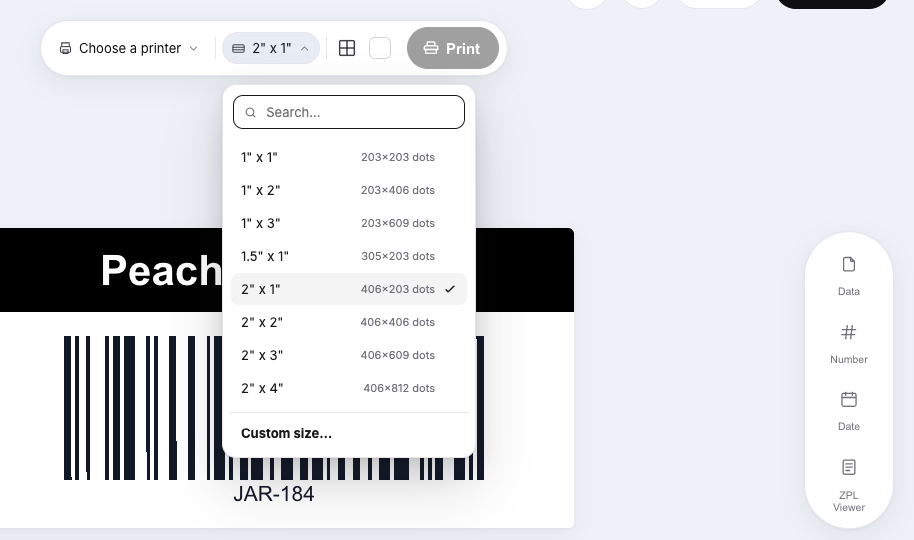
Other common roll sizes open the same way: 3 x 1, 2.25 x 1.25 and the 4 x 2 bin label. Print one and hold it against the roll before you print fifty.
Still off? These pages go one problem deeper: labels skipping, blank labels, only half the label prints and the printer feeds too far.
Zebra labels to print one test on
These are real renders from the editor. Click one and it opens at that size.


FAQ: calibrating a Zebra printer
How long does Zebra calibration take?
A few seconds. The printer feeds a few labels while it measures. On a GK420d, Zebra says standard calibration feeds 1 to 4 labels.
Do I need to calibrate after every new roll?
No, not for the same media type from the same batch. Zebra's ZD421 and ZD621 guide says to press FEED once or twice instead. Calibrate when the size or type of label changes.
Is there a ZPL command to calibrate?
Yes. ~JC runs a media calibration. Zebra's ZD620 and ZD420 guide lists it for MEDIA/RIBBON CAL.
What's the difference between SmartCal and manual calibration?
SmartCal measures a few labels by itself. Manual calibration walks the bare liner and then a label past the sensor, for media SmartCal can't read.
Why does my Zebra still skip labels after calibration?
Usually the sensor position, the wrong label size in the software, or a black mark roll read by the gap sensor. The Zebra labels skipping page goes through each one.
Can mylabelmaker calibrate my Zebra?
No. Calibrate with the buttons on the printer, then pick the matching size in the app and print one test label.