Free WiFi QR code labels
Yes. You can make free WiFi QR code labels. Hotels, Airbnbs, cafes, and offices all want the same sticker: scan, join, done. Open the WiFi QR template, put the network name in plain text, and print a stack for tables or rooms. No signup.
Tool: mylabelmaker → Add QR → paste a standard WiFi QR payload (or a short URL that redirects to join instructions).
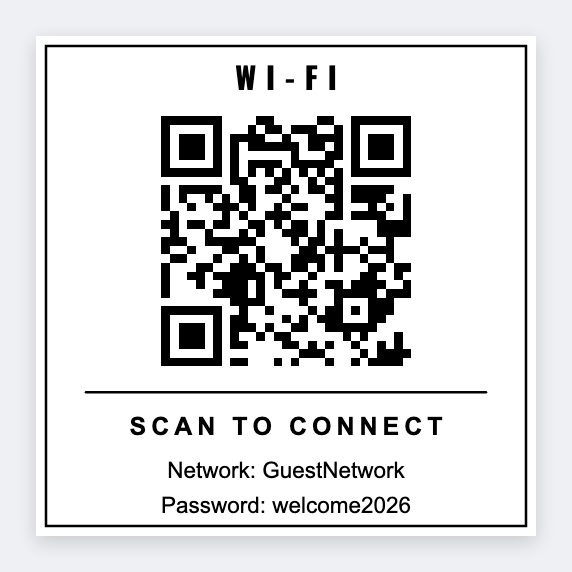
What goes on a good WiFi sticker
- Large scannable QR
- Network name (SSID) in plain text for humans
- Optional “Guest WiFi” headline
- Optional password text if you accept the security tradeoff of printing it
- Logo for the venue
WiFi QR payload format
Most phones understand the common WIFI: string form (WPA/WPA2). Example pattern (replace values):
WIFI:T:WPA;S:YourNetworkName;P:YourPassword;;
Paste that full string as the QR content. Double-check on an iPhone and an Android before you print 200 stickers.
Printed passwords are convenient and less secure. Prefer a dedicated guest network with isolation, rotate credentials when staff leave, and never put admin WiFi on public stickers.
Batch WiFi labels for many rooms
If each room has a different SSID/password, put them in a spreadsheet and use tokens:
- Columns:
room,wifi_payload,ssid - QR value:
{{wifi_payload}} - Caption: Room
{{room}}·{{ssid}}
Same engine as product QR: free QR code label maker.
Print tips
- 2×2 inch white stock is a reliable scan size for tables.
- Matte thermal or quality paper, avoid glossy glare under restaurant lights when possible.
- Thermal volume: Zebra path via Browser Print; office printers: export PDF/PNG.
Print the guest WiFi sticker
Network name on the face. Password inside the QR. Print on site.
Open wi-fi access qr template