How to make name tags online free
Open the free label maker: app.mylabelmaker.com. No signup. Design the label, then print to a Zebra or download PNG, PDF, or ZPL.
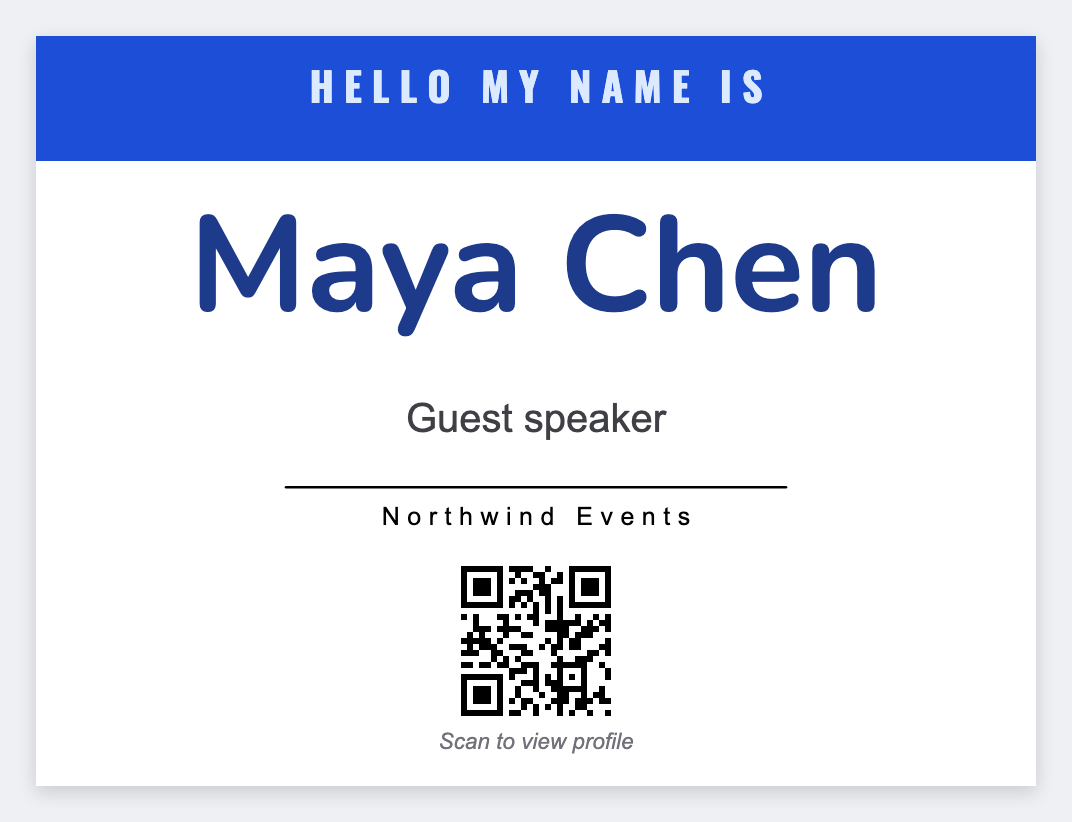
You can make name tags online free in the free label maker. Set a 4x3 or 3x2 badge, put {{first}} large, add company and role, then load your list. No Canva sheet and no Word mail merge.
Good to know: This prints one badge per row. We don't lay out Avery 8-up sheets automatically. Export PDF if you need a laser printer.
How to make name tags online in four steps
- Open the name badge template. No signup.
- Set 4x3 for a conference badge, or 3x2 for a smaller tag.
- Add {{first}} large, then {{last}}, {{company}}, and {{role}}.
- Load the guest list from Excel or Google Sheets. Preview a few rows. Print or download PDF.
What to put on the badge
- First name large enough to read across a table
- Last name, company, and role smaller
- Optional logo. Keep a quiet zone around the name
- Skip tiny body copy. People glance, they don't read a paragraph
Print or save
Got a Zebra? Print with Browser Print at the printer's DPI. No Zebra? Print from this computer, or download PNG, JPG, SVG, PDF, or ZPL. Save JSON if you want to open the layout again later.