How to make cottage food labels at home
Do this in the free label maker: app.mylabelmaker.com. No signup. Design the label, then print to a Zebra or download PNG, PDF, or ZPL.
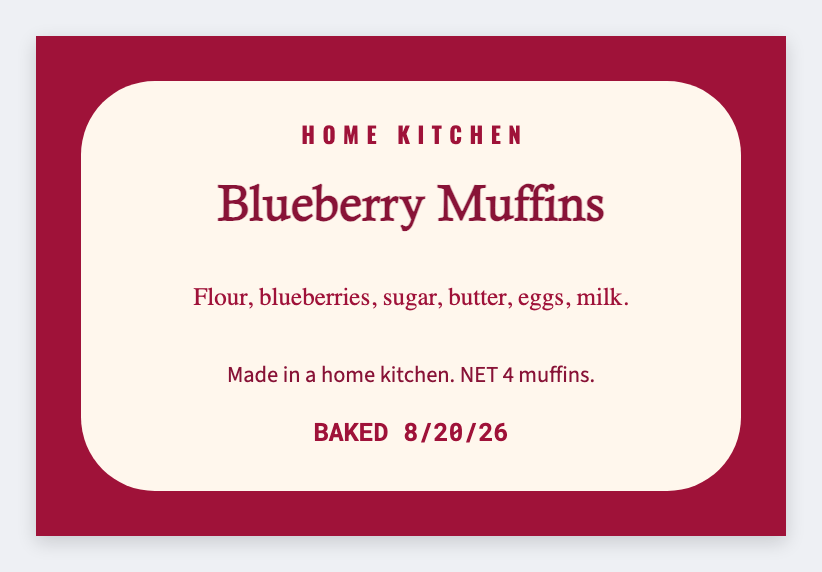
You can make cottage food labels at home in the free label maker. Set the sticker size, add product name, ingredients, and net weight, then print a test. No signup. We design the face. You follow your state cottage-food rules.
Good to know: We're not a lawyer or a health department. Required words (ingredients, allergen, made in a home kitchen) are your job. We don't certify labels.
How to make cottage food labels
- Open https://app.mylabelmaker.com. No signup. Set the sticker size on the jar or bag (often 2x3 or 3x2).
- Add product name, a short ingredient line, net weight, and your business name.
- If you have many SKUs, put each product on a row and map {{product}} {{ingredients}} {{net}}.
- Print one test on the real stock. Then print the batch or export PDF.
What people usually put on the face
- Product name
- Ingredient list in descending weight
- Allergen line if your state wants it
- Net weight, your name or kitchen name, city
Check your state's cottage food page before you sell. The sticker is the easy part.
Print or save
If you have a Zebra, print from this computer with Browser Print at the printer's DPI. If you don't, download PNG, JPEG, SVG, PDF, or ZPL. JSON keeps the layout so you can open it later.