Free equipment ID labels
Do this in the free app: app.mylabelmaker.com. No signup. Design the label, then print on a Zebra or download PNG / PDF / ZPL.
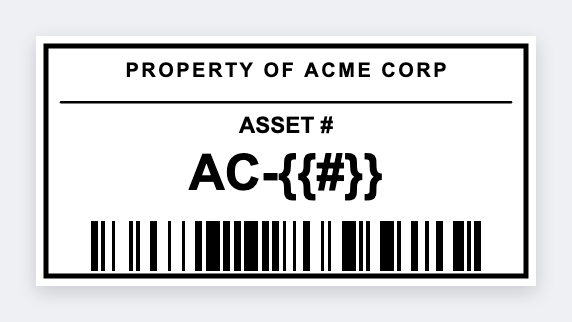
Yes. You can make free equipment ID labels for laptops, tools, and machines. Open the asset tag template, put the ID in large type, add a barcode or QR, then print the stack from your inventory sheet.
How to make free equipment ID labels
- Open the asset tag template. No signup.
- Set the size to the sticker you actually put on the machine.
- Put the asset ID in large type. Add a barcode or a QR to your CMMS if you have one.
- Print on a Zebra, or download PNG or PDF. Load Excel if you have a whole register.
What to put on an equipment ID label
Someone walking the floor should read the ID without squinting. The barcode is for the scanner.
- Asset ID large type
- Barcode + QR
- Department / location tokens
- Service due text
Print a whole list from Excel or Google Sheets
Export the asset register. One row per machine. Map the ID column into large type, and the same value into a barcode or QR. Preview two rows, then print the stack. Guide: mail merge labels.
Print or save
If you have a Zebra, print from the browser with Browser Print at the printer's DPI. Everyone else: download PNG, JPEG, SVG, PDF, or ZPL. JSON keeps the editable master so you can come back to it.